
TelliApp Workshop — for phone, computer and laptop repair shops
All your orders in one app — from intake to pickup
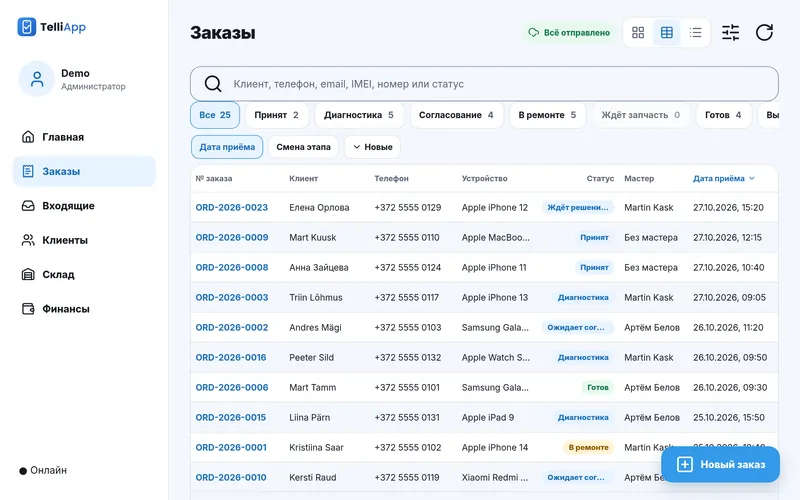
Intake report signed by the customer, repair status by QR with no phone calls, one-tap price approval, stock and shipping by post. Intake works without internet too, and the data lives on your workshop's server.
Already running in a workshop in Estonia
Customer in the loop
Customers don’t have to call and ask “so, how’s it going?”
Everything customers need to know about the repair, they see for themselves — via a link or the QR code on the report.
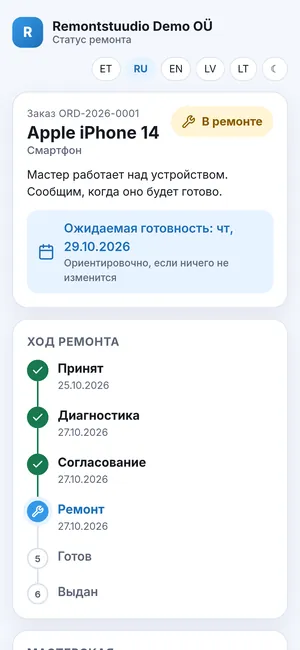
Repair status by QR
The customer scans the QR code on the intake report or types in the code from it — and sees the repair stage, from “Received” to “Ready” and “Handed over”, and when to expect it done. No calls to the workshop.
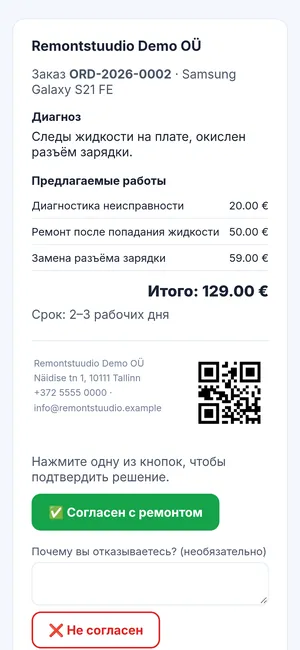
One-tap approval
The customer gets the list of repairs with prices in Telegram or by email and approves the repair with one tap. Not happy with it? They can decline and explain why.
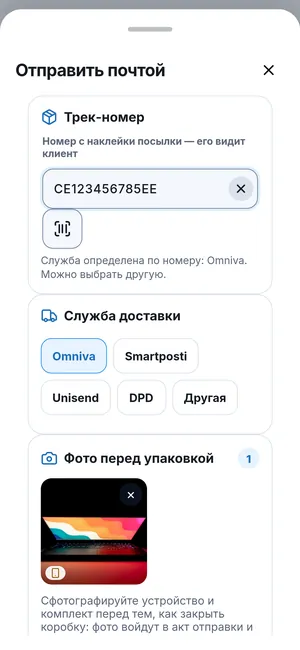
Shipping by post
Omniva, Smartposti, DPD or Unisend: the customer gets a tracking number, a tracking link and the shipping report, and marks the parcel as received on the status page themselves.
Documents in the customer’s language
Reports and invoices in Estonian, Russian or English. Latvian and Lithuanian on request.
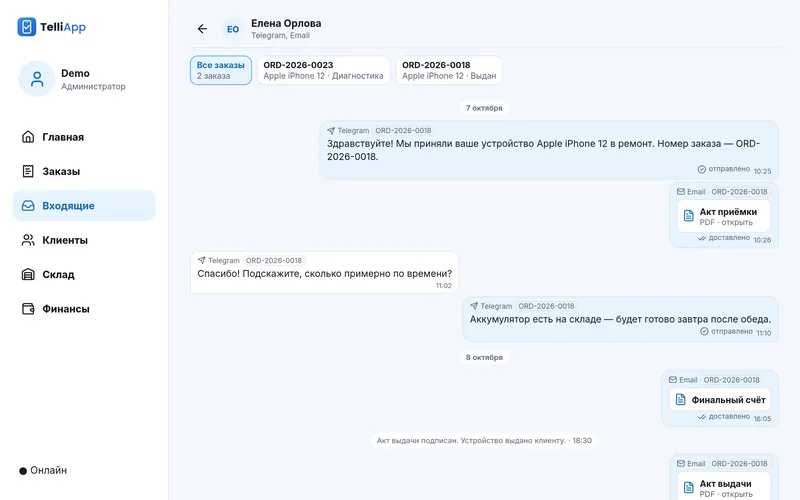
Telegram and email messages sit in one order thread: you see everything the customer wrote and everything sent to them. Automatic status messages reach the customer through the workshop’s Telegram bot; by email, documents go out when you send them.
Order journey
From intake to warranty — all in one order
Every step leaves a trace: a document, a signature, an amount. Nothing to remember later, nothing to dig out of paper piles.
-
Intake
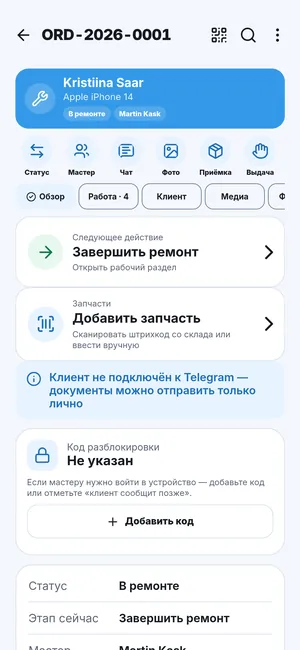
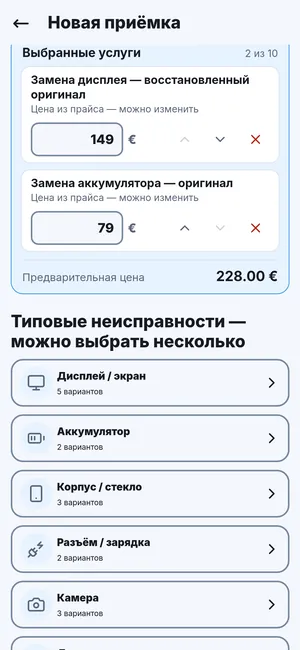
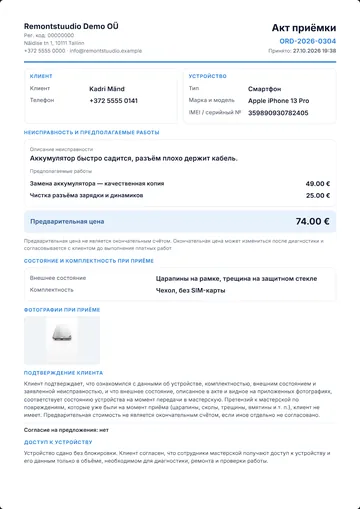
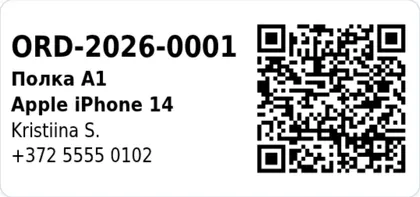
The customer signs the intake report on screen. One order can hold several services at once — we load a ready list of typical repairs when you get started. The device gets a shelf automatically, and the label shows the order number and a QR code.
-
Diagnostics and price
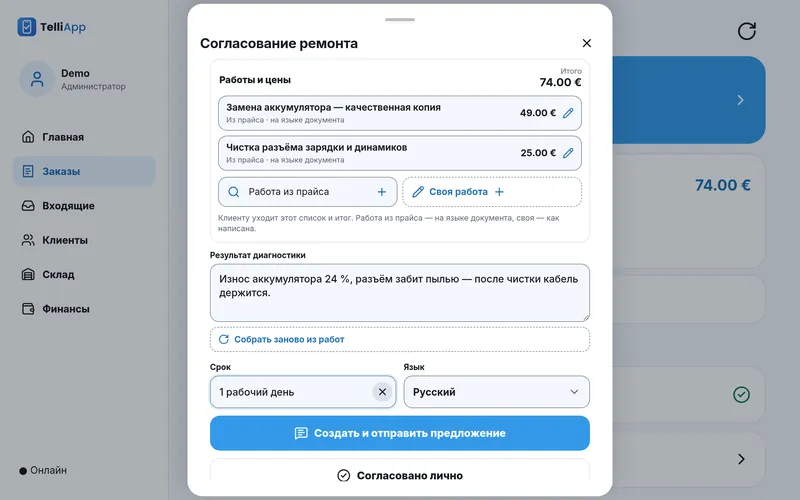
The technician writes down what they found and names the price. The customer approves it themselves — via the link in the email or a button in Telegram, and after a phone call you can mark the approval by hand. No more “that’s not what we agreed”.
-
Repair
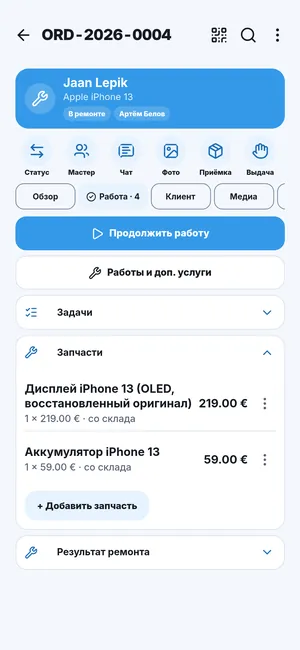
Parts are written off from stock right in the order, and stock levels update themselves. New parts can be received one by one or a whole pack at once.
-
Pickup or shipping
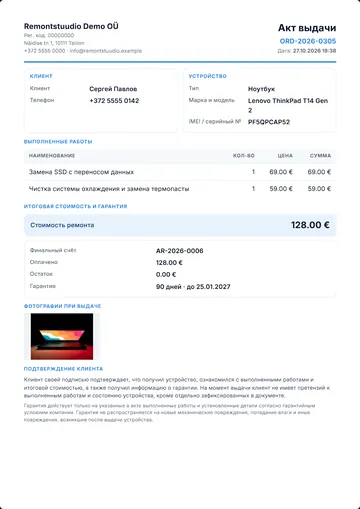
The customer picks up the device and signs the handover report on screen — or gets it by post, with a tracking number, and marks it as received on the status page. The PDFs of the report and the invoice can be sent to the customer by email and Telegram.
-
Warranty
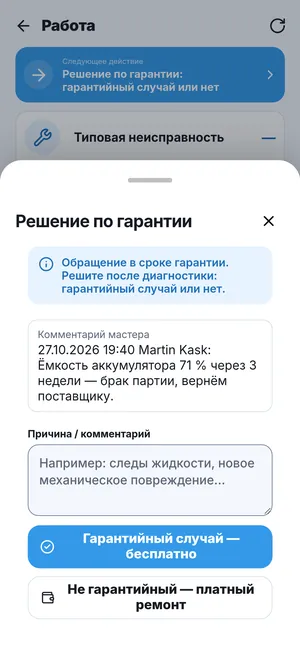
Customer back under warranty? A warranty claim opens from the old order. Warranty costs are tracked separately — you see what warranty really costs you.
Features
Everything a workshop needs. Nothing it doesn't.
Built for the counter and the bench, not for reports for their own sake.
-
Stock and receiving by the pack
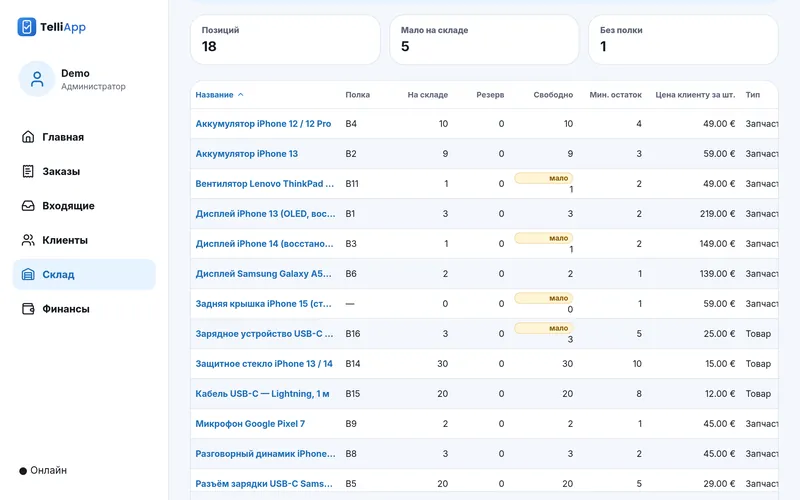
Parts and goods by type, stock levels at a glance, and the app tells you when something runs low. A box of 10 arrives — you enter it as one line, and the stock shows 10 right away.
-
Price list from Excel
Upload your list of repairs and prices from Excel or CSV — no typing it in by hand. You can download the current price list as a file at any time.
-
Shelves and QR labels
Each device gets a shelf automatically; the label shows the order number, the shelf and a QR code. Nothing gets lost on the rack.
-
Reports for insurers
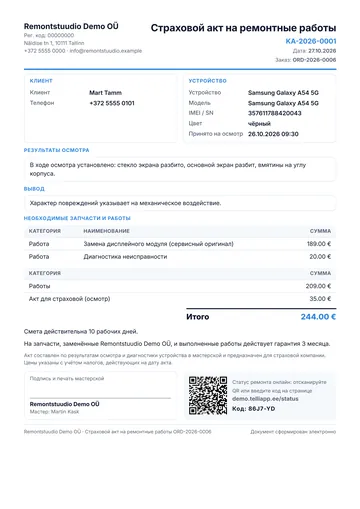
Inspection, photos, a verdict of “repair possible” or “repair not possible” — and the report goes to the insurance company. Starting the repair from the report takes a couple of taps.
-
Money and debts
See how much you earned, what the profit is and which customers still owe you. The owner also sees expenses and the month’s result. A file for your accountant — in one tap. A cash register for selling goods with receipts is switched on during setup.
-
Team chat
A shared workshop chat right in the app: messages, photos, voice messages and files. Work matters don’t get lost in personal messengers.
-
Technicians and access
Everyone has a role. A technician doesn’t see the workshop’s revenue or finances.
-
Works offline
Connection gone? Taking in an order, photos and the customer’s signature on the intake report keep working, and stock mostly does too. When the internet is back, everything is sent to the server on its own. Invoices, payments, repair approval, completing a repair, the cash register and sending documents work only with a connection.
-
Phone, tablet, computer
Runs in the browser on a phone, tablet or computer — Android and iPhone. Android and computer: browser menu → “Install app”. iPhone: Safari → “Share” → “Add to Home Screen”.
Who it's for
For people who fix things: phones, computers, laptops
From a single technician with a phone to a team with roles and a shared chat.
-
Phone and smartwatch repair
Intake with photos and a signature, parts by model, a shelf and a QR label. The counter runs smoothly — no pile of paperwork.
-
Computers, laptops, consoles
Long diagnostics, price approval, parts on order. The order doesn't get lost, even if it sits for a week.
-
Working with insurers
Inspection, photos, the report and sending it to the insurer — all in one order.
-
From one technician to a team
One technician — everything on the phone. A team — roles, access and chat. Growing — you just add people.
Your data
Your data stays yours
Where it lives and who sees it — no small print.
-
Your workshop’s own server
Order data is stored on your workshop’s server, not in one shared database for everyone. Documents — reports and invoices — live on the workshop’s Google Drive, which is connected during setup. We help choose and set up the server.
-
Every night — a copy off the server
The copy is encrypted and goes to your Google Drive. Once a week it is automatically checked that the data can be restored from it. If something is wrong with a copy, we find out right away and sort it out.
-
Sign in with a PIN or Face ID
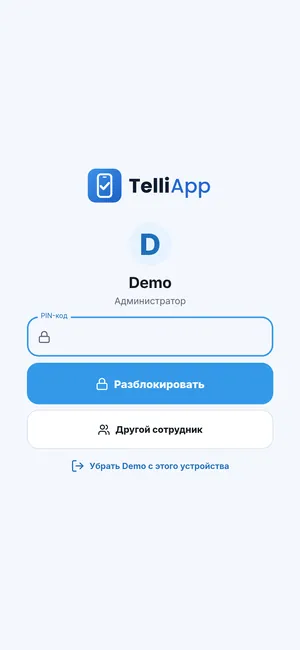
Every employee has their own PIN, and on the phone you can sign in with Face ID or a fingerprint — quick and convenient.
-
Unlock code kept safe
The customer’s phone unlock code is stored encrypted and erased automatically once the device is handed over.
-
Roles and access
Access depends on the role: a technician doesn’t see revenue or finances, and only the owner sees expenses, staff and the action log.
Getting started
Three steps and you're working
No long rollout. We show, set up, move your data — and you're in business.
-
Demo
We show the app on your own examples — online, at a time that suits you.
-
Installation and setup
We install the app on your workshop’s server, set up statuses, documents and roles, and load a ready list of typical repairs. We move customers and orders over from your old program or spreadsheets.
-
Work and support
You work, and we’re reachable right from the app: “Contact support” and “Report a problem” if something goes wrong. The owner installs app updates with one tap.
Price on request
Depends on the size of the workshop and how much data there is to move. We'll tell you after the demo.
FAQ
Frequently asked questions
Didn't find yours? Ask at the demo.
Do I need internet?
Not for taking a device in: the order, photos and the customer’s signature on the intake report are saved on the phone and sent to the server on their own once the internet is back. The official PDF of the report is made by the server; without a connection the report is shown as a draft. Stock mostly works without a connection. Only with internet: the first sign-in to the app, invoices and payments, repair approval, completing a repair, the cash register and sending documents to customers. The handover report can be signed offline only when the repair is completed and the final invoice is issued and paid.
Can the customer see the repair status?
Yes. With the code or the QR on the intake report, customers check the repair stage themselves — no calls to the workshop.
Can I send the device to the customer by post?
Yes. Omniva, Smartposti, DPD or Unisend: the customer gets a tracking number and a tracking link, and marks the parcel as received on the status page themselves.
Which languages are the documents in?
Estonian, Russian and English. Latvian and Lithuanian on request.
Where is the data stored?
Order data is on your workshop’s server, not in a shared database. Documents (reports, invoices) are on the workshop’s Google Drive: Drive is connected during setup, and without it reports and invoices can’t be issued.
What if the server breaks down?
Every night an encrypted copy is made off the server, and once a week it is automatically checked that the data can be restored from it. If something is wrong with a copy, we find out right away and sort it out.
Who else can see our data?
Only you and we have access to the server — for installation, updates and support.
Can I move my old data over?
Yes. We move customers, orders and stock from your old system or spreadsheets — it's part of getting started.
How much does it cost?
Price on request — it depends on the size of the workshop. Request a demo and we'll name the price after we talk.
Do I need to install anything?
From an app store — no: the app opens in the browser and installs to the home screen straight from the site. Android and computer (Chrome, Edge): browser menu → “Install app”. iPhone: Safari → “Share” → “Add to Home Screen”. All you need is the workshop’s server — we help choose and set up the server. What is a PWA →
Demo
Request a demo
Tell us a few words about your workshop — we'll agree on a time and show the app on your own examples.